Team Messaging
Send announcements to your entire roster by email — game reminders, weather updates, schedule changes — straight from the admin panel.
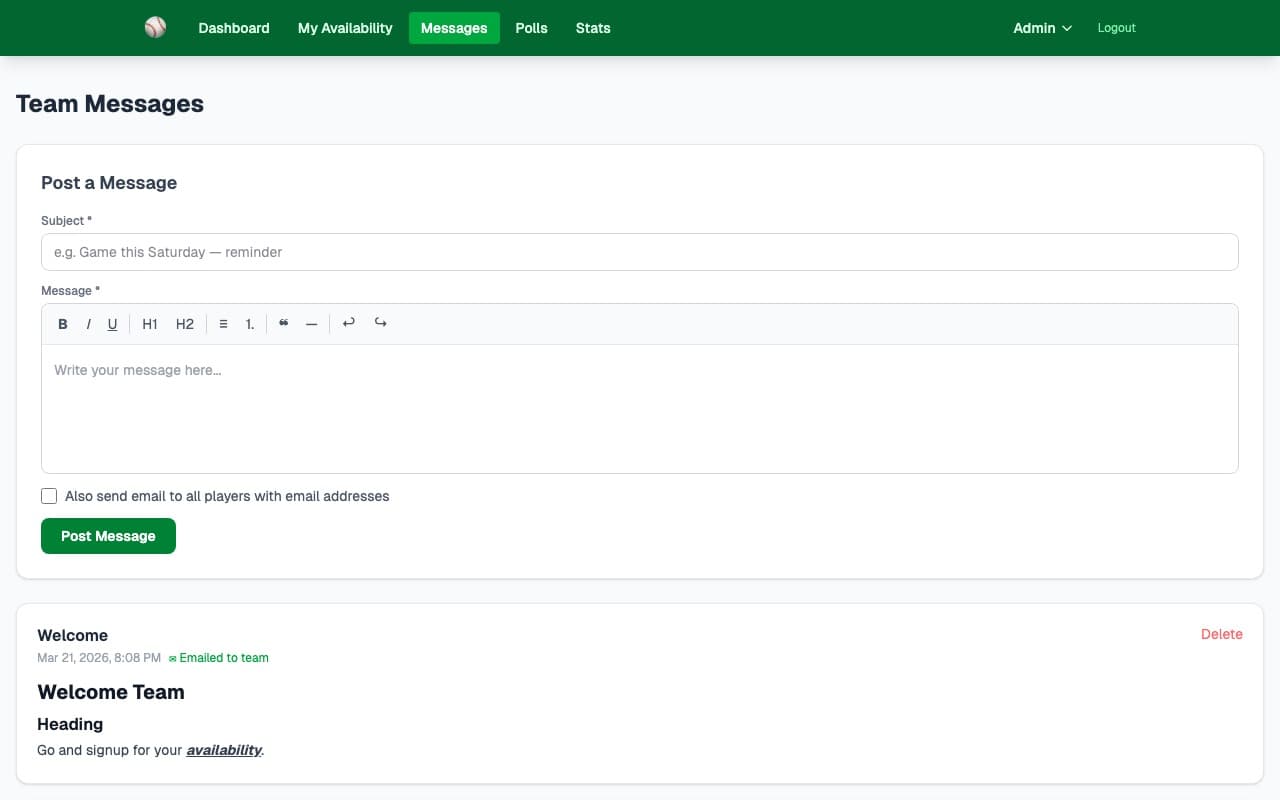
What it does
No more hunting for everyone's number in a group text thread. The Team Messaging tool lets admins compose and send an email to every player on the roster with one click. All sent messages are archived so the whole team can review them.
- ✓Compose and send an email to every player on the roster in seconds
- ✓Full message history — all past announcements visible to the team
- ✓Timestamped messages so players know when updates were sent
- ✓Email badge shows which messages were sent vs. saved as drafts
- ✓Perfect for game reminders, weather delays, field changes, and lineup notes
- ✓Works with any email address — players don't need to install anything
- ✓Sent from your configured team email address
How it works
Go to the Messages section in admin, write a subject and message body, and hit Send. That's it.
Y-Not sends the message to every player email address on your roster. No BCC lists, no copying and pasting.
Players can view all past messages on the Messages page — no login required — so nobody misses an update.
Key capabilities
One-Click Broadcast
Write your message once and send it to the full roster. No managing email lists — it uses your roster automatically.
Message Archive
Every sent message is saved and visible on the team Messages page, timestamped so players can see the full communication history.
Works on Any Device
Players receive a standard email they can read on any phone or computer. No app download, no notification permissions needed.
Ready to try it?
30-day free trial — no credit card needed. Your team URL goes live instantly.