Softball Game Scheduling
Add and manage every game in your season — dates, times, locations, home/away, and results — all in one organized view.
What it does
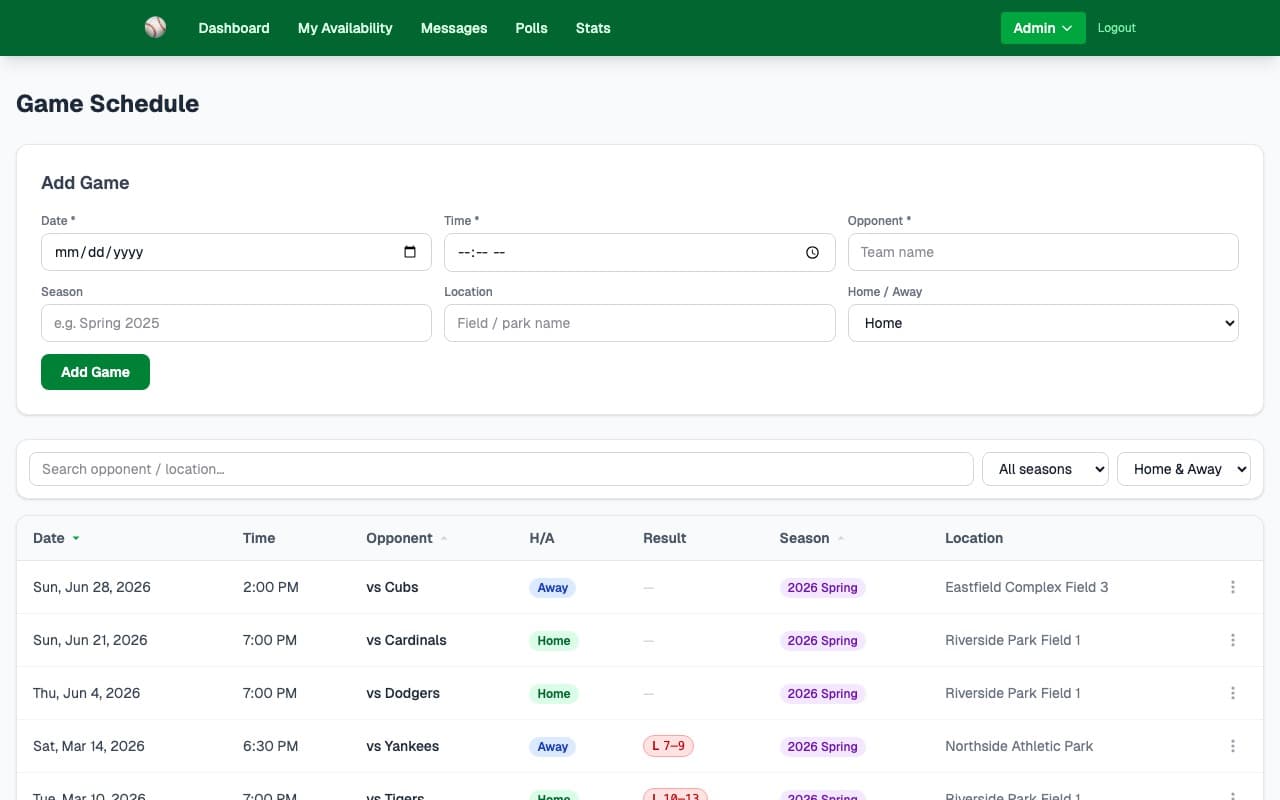
The Game Schedule gives your admin one place to manage the full season. Add games in seconds, then filter and sort to find what you need. Every game row connects directly to the lineup builder, live scoring, and scorecard printing.
- ✓Add games with date, time, opponent name, field location, and home/away
- ✓Filter by season, search by opponent or location, filter home vs. away games
- ✓Sort by date ascending or descending
- ✓See win/loss/tie results displayed on each game row once scored
- ✓Open the lineup builder or live scoring directly from any game row
- ✓Print a blank scorecard for paper scoring at the field
- ✓Upcoming games are visible to all players on the team dashboard — no login needed
How it works
Enter the date, time, opponent name, field location, and home/away. Games appear on the admin schedule and the team dashboard instantly.
As players set their availability, the dashboard shows live In/Maybe/Out headcounts for each game so you know who's showing up.
Click straight from the schedule row to build the batting lineup, assign fielding positions, or start tracking at-bats live.
Key capabilities
Search & Filter
Search by opponent or field location. Filter to home games, away games, or a specific season. Sort newest-first or oldest-first.
Win/Loss Tracking
Game results (W/L/T and score) appear on the schedule automatically once you score the game in the live scoring tool.
Print Scorecards
Generate a print-ready blank scorecard for any game directly from the schedule row menu — great for keeping paper score at the field.
Ready to try it?
30-day free trial — no credit card needed. Your team URL goes live instantly.